JHU ENGINEERING INNOVATION / INDIVIDUAL ELECTRONICS PROJECT
CircaDock.
A bedtime idea,
built in code.
Could a phone dock make the decision to put a phone down more tangible? During my JHU summer program, I developed a design that connects room conditions, a phone-presence input, and a clear sequence of feedback.
Read my design notebookDOCUMENTED PROGRAM LOGIC
The program,
in six states.
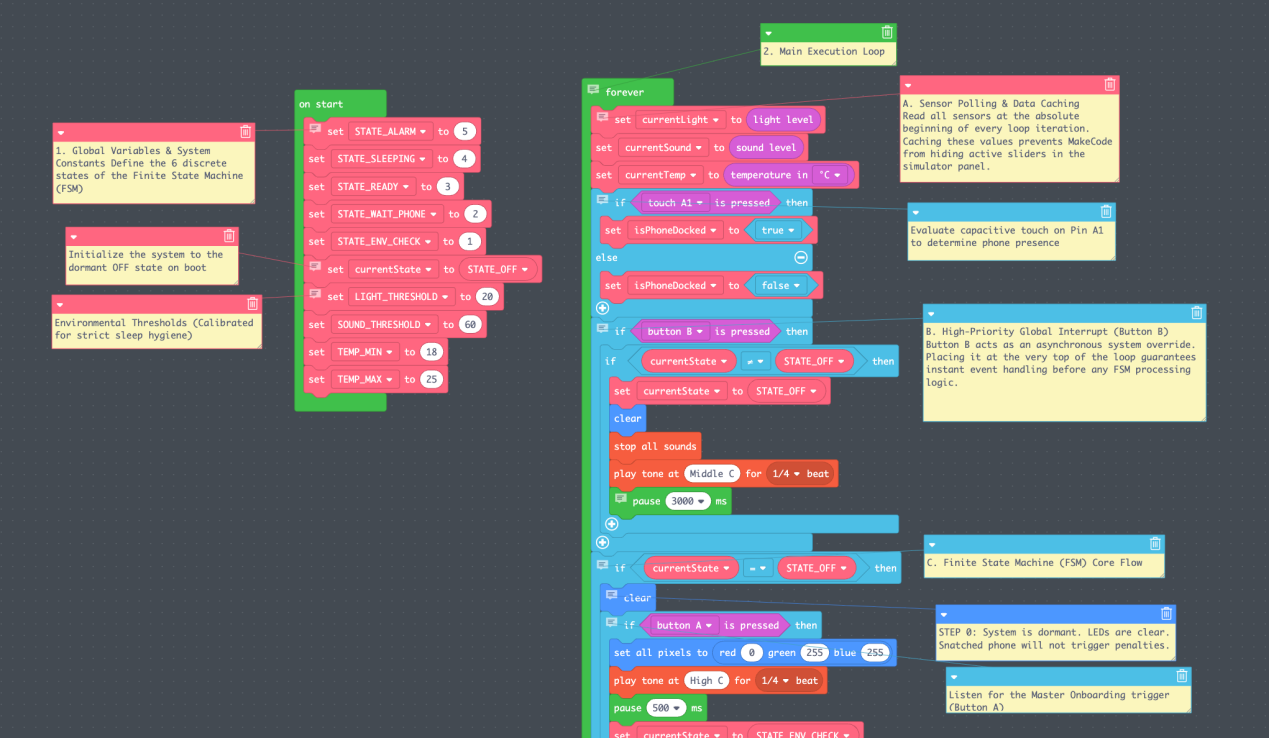
- 01OffButton A starts the sequence.
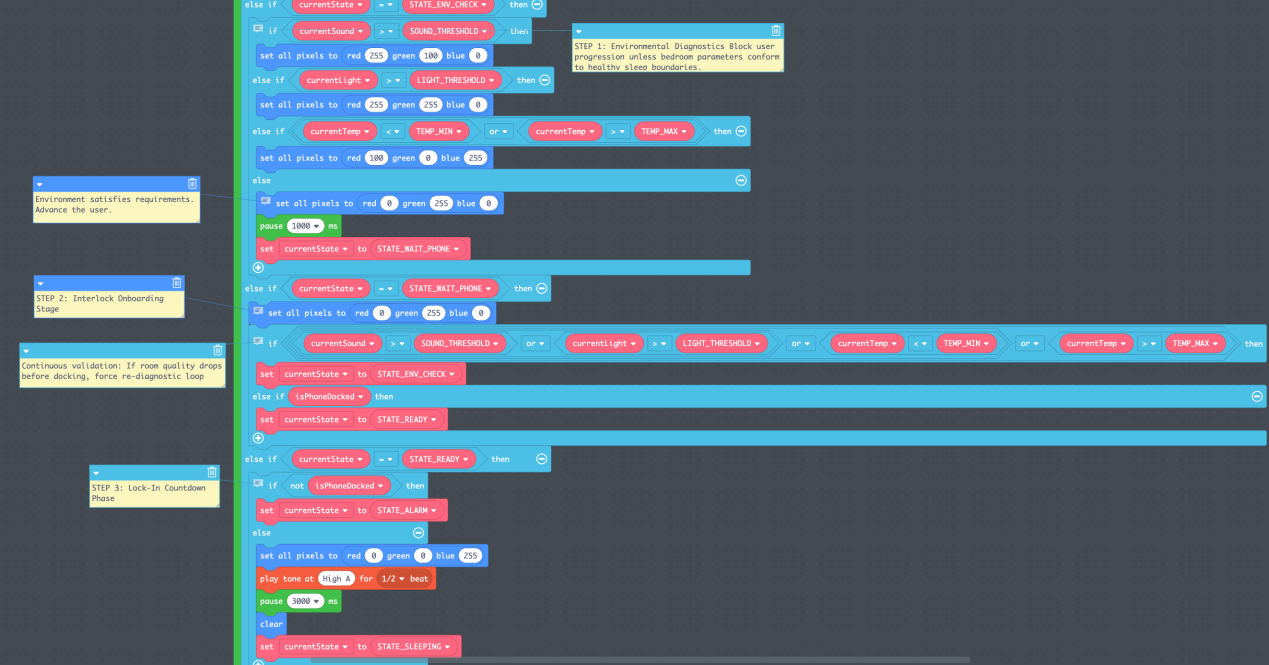
- 02Check the roomRead light, sound, and temperature.
- 03Wait for the phoneRequire a docking input to continue.
- 04ReadyBlue feedback, a three-second delay, then lights off.
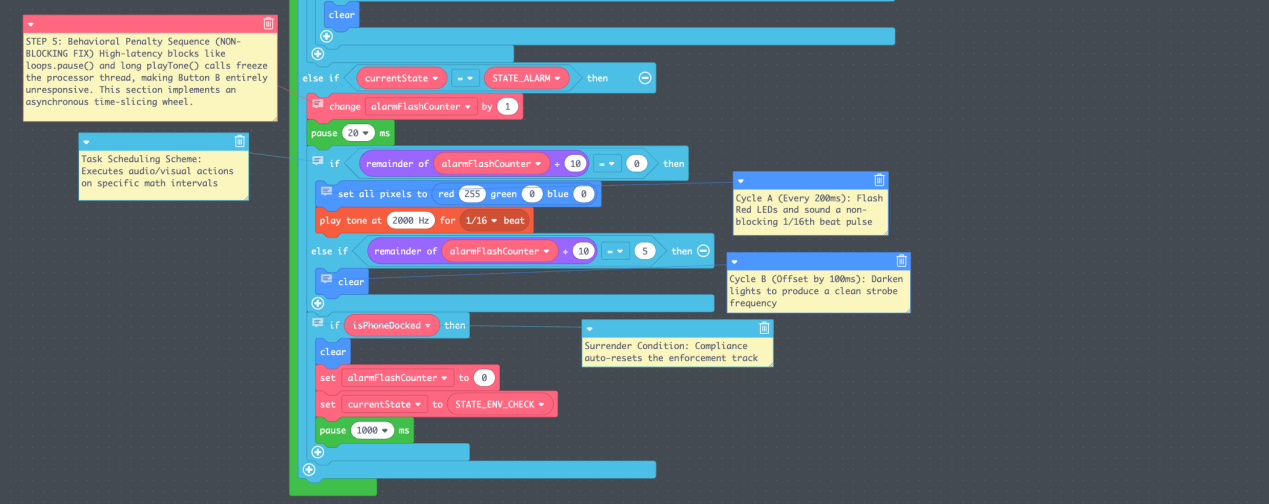
- 05MonitorWatch the docking input and room conditions.
- 06AlarmRespond to removal; redocking returns to the room check.
Button B is the global stop control.
THE DESIGN QUESTION
More than
another reminder.
I first considered a temperature-aware water reminder. I set it aside because another alert could be easy to ignore, and similar reminder products already existed.
The sleep-dock concept introduced a different condition: monitoring would begin only after the phone-presence input was active. This was a program rule with an alarm response, rather than a mechanical lock on the phone.
The platform was Circuit Playground Express, programmed in MakeCode. The design combined light, sound, and temperature readings with LED feedback, a buzzer, and Buttons A and B.
THE ITERATIONS
Seven versions.
A more dependable exit.
The most useful progress came from finding where the program became difficult to operate—and revising the next version around that problem.
- 01
Find a starting point
The first version had nonworking code and an incomplete set of functions.
Shared version 1 ↗ - 02
Make the docking input testable
I repaired bugs and substituted a button input for the proposed capacitive detector, which required extra hardware and was difficult to simulate.
Shared version 2 ↗ - 03
Get the basic sequence working
The core behavior was in place. I then considered adding temperature to the conditions checked before monitoring.
Shared version 3 ↗ - 04
Add temperature—and uncover another bug
Temperature became an additional input, but the simulator's sound control could disappear depending on the light setting.
Shared version 4 ↗ - 05
Separate the sensor controls
The three simulator inputs were available independently. The next problem was an alarm state that did not stop as intended.
Shared version 5 ↗ - 06
Introduce a start control
Button A started the program, but stopping the alarm still required repeated presses.
Shared version 6 ↗ - 07
Give stopping its own control
The final documented iteration kept Button A for starting and used Button B to stop promptly. A dependable exit became part of the design itself.
Open the final shared version ↗
INSIDE THE NOTEBOOK
The logic,
in blocks.
Original screenshots from my design notebook. They show documented code variants, including the proposed A1 capacitive input; the iteration notes describe using a button input for simulation.
WHAT THIS WORK DOCUMENTS
A control system
to keep improving.
This project documents design decisions and MakeCode iterations. It does not establish a tested physical phone detector or measured changes in sleep or phone-use behavior.
The code uses light and sound thresholds of 20 and 60 in the platform's sensor values, plus a selected temperature range of 18–25°C. These are design settings; the light and sound values are not stated in lux or decibels.
A simulated sunrise appears in the CircaDock concept summary as a further feature. It sits outside the six-state program documented here.
Read the original 7-page notebook